Case study · Plugin
WPBakery Hero Switcher
Build multiple hero variants inside WPBakery, then choose which one displays on the live site, globally or per page.
The project
Build multiple hero variants inside WPBakery, then choose which one displays on the live site, globally or per page. Keep the other variants in the editor for easy comparison.
Built for WPBakery sites that want clean, fast hero testing without duplicating pages.
01 Context and challenge
The problem
On WPBakery sites, trying a different hero usually means duplicating the page or rebuilding the row, then deleting whichever version loses. The alternatives you wanted to compare are gone, duplicate pages drift out of sync, and there is no safe way for QA to preview a variant without changing what is live.
I wanted every hero variant to stay in the editor, with one switch deciding which one ships, globally or per page, and URL overrides so anyone can check a variant without touching saved settings.
02 Technical implementation
How it works
- Create multiple hero rows in WPBakery (for example: Hero A, Hero B, Hero C).
- Assign each hero row a marker token using Row Extra Class Name or Row ID:
hero-option-1,hero-option-2,hero-option-3. - Choose which one displays:
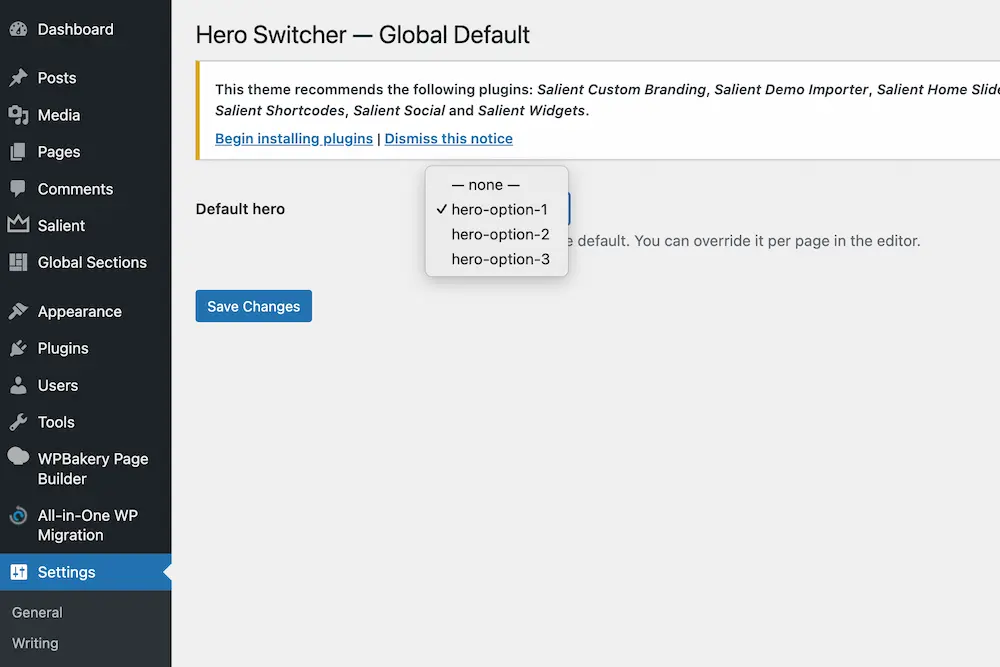
- Global default: Settings → Hero Switcher (or ACF Options if enabled)
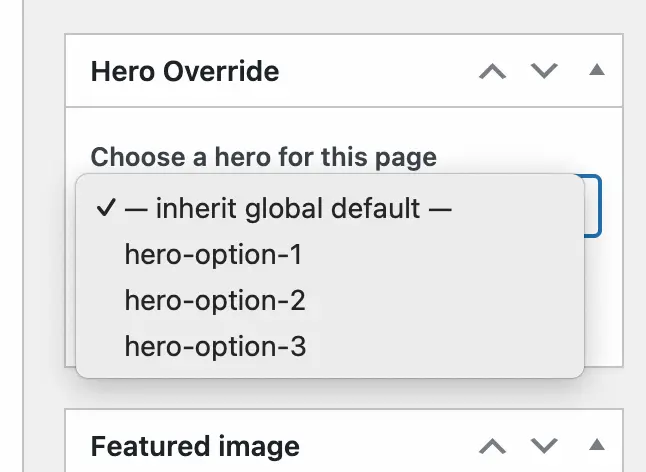
- Per-page override: the “Hero Override” meta box on the page
- On the front end, the plugin renders only the selected hero and removes the other variants from output.
How AI was used
The design and code are mine. AI helped scaffold the plugin structure and boilerplate, offered inline suggestions while I worked, helped me track down bugs, and helped draft the documentation.
Code
The repository is private. Code is available on request.
03 Final experience
Screenshots